推荐学习书目
› Learn Python the Hard Way
Python Sites
› PyPI - Python Package Index
› http://diveintopython.org/toc/index.html
› Pocoo
值得关注的项目
› PyPy
› Celery
› Jinja2
› Read the Docs
› gevent
› pyenv
› virtualenv
› Stackless Python
› Beautiful Soup
› 结巴中文分词
› Green Unicorn
› Sentry
› Shovel
› Pyflakes
› pytest
Python 编程
› pep8 Checker
Styles
› PEP 8
› Google Python Style Guide
› Code Style from The Hitchhiker's Guide
79lawyer
V2EX  ›  Python

请教用 uWSGI 启动 Django 项目遇到的问题

  •  
  •   79lawyer · Apr 14, 2021 · 2030 views
    This topic created in 2002 days ago, the information mentioned may be changed or developed.

    第一次使用 uwsgi,以前一直用的 runserver 启动。。。
    如图一是我的项目目录,图二是我的 uwsgi.ini 的配置,
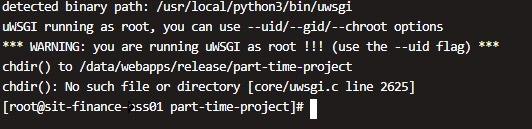
    启动之后日志里报错:chdir: no such file or directory [core/uwsgi.c],如图三。
    不知道哪里出了问题,网上的方案都试过了也没能解决,求大佬指导🙏
    图 1:
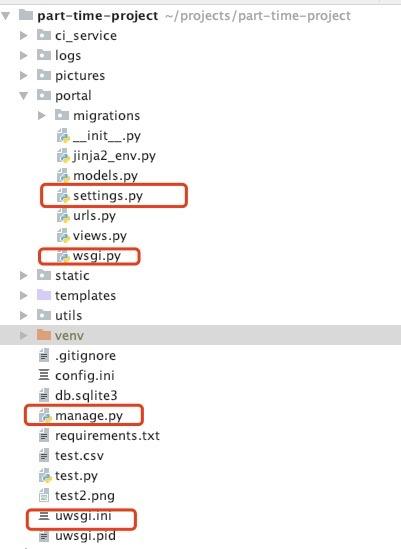
    图 2:
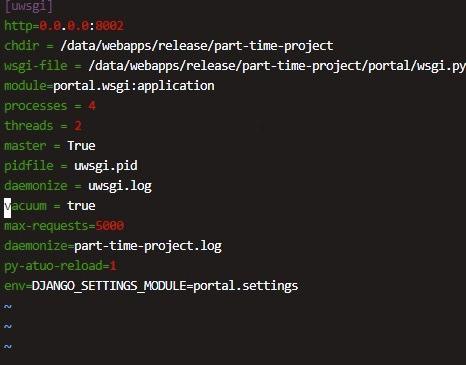
    图 3:
    8 replies  •  2021-04-14 15:04:54 +08:00
    ruanimal
        1
    ruanimal  
       Apr 14, 2021
    不是说路径不对吗
    79lawyer
        2
    79lawyer  
    OP
       Apr 14, 2021
    @ruanimal #1 这个我看出来了,但是网上找的教程都试了一下,还是一直找不着路径,太菜了我
    sugarkeek
        3
    sugarkeek  
       Apr 14, 2021
    chdir 是项目的绝对路径吧,你 cd 进项目 pwd 执行一下,看看绝对路径
    maocat
        4
    maocat  
       Apr 14, 2021
    @xuqiccr 项目目录和 uwsgi 下的 chdir 不是一个路径啊
    maocat
        5
    maocat  
       Apr 14, 2021
    @maocat 你的项目在~/projects, uwsgi 在 /data/webapps
    est
        6
    est  
       Apr 14, 2021   ❤️ 2
    chdir = %d..

    这样可以自动设置当前路径为 uwsgi.ini 的上一级目录。

    如果目录层级多或者少,就 %d../.. 或者直接 %d
    79lawyer
        7
    79lawyer  
    OP
       Apr 14, 2021 via iPhone
    @maocat ~projects 是我本地的截图,/data 是在服务器上的,这个有歧义了😅
    79lawyer
        8
    79lawyer  
    OP
       Apr 14, 2021 via iPhone
    @est 🐮🍺,解决了,哥太强了
    About   ·   Help   ·   Advertise   ·   Blog   ·   API   ·   FAQ   ·   Privacy   ·   Solana   ·   2703 Online   Highest 6679   ·     Select Language
    创意工作者们的社区
    World is powered by solitude
    VERSION: 3.9.8.5 · 35ms · UTC 07:25 · PVG 15:25 · LAX 00:25 · JFK 03:25
    ♥ Do have faith in what you're doing.